시리즈 | LLD - 3. 다음 리스트의 크기는 (N*9/8+6)&~3입니다.
파이썬의 리스트는 가장 많이 사용하는 built-in mutable 타입 중 하나이다.
이번 글에서는 이러한 리스트의 CPython수준에서의 작동을 명확히 알아보자.
Declaration
Python의 리스트는 multi-type을 지원한다.
당연하게도 모든 원소가 PyObject*이기 때문이다.
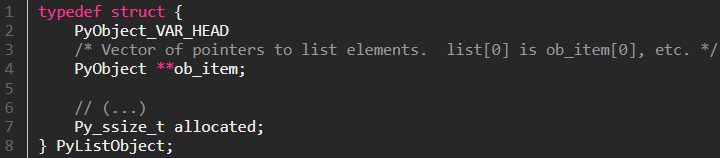
python list의 구현부를 보자. [링크]
typedef struct {
    PyObject_VAR_HEAD
    /* Vector of pointers to list elements.  list[0] is ob_item[0], etc. */
    PyObject **ob_item;
    // (...)
    Py_ssize_t allocated;
} PyListObject;
Copyright (c) Python Software Foundation. Licensed under the PSF License v2.
여기서 PyObject_VAR_HEAD를 보면 [링크]
#define PyObject_VAR_HEAD PyVarObject ob_base;Copyright (c) Python Software Foundation. Licensed under the PSF License v2.
이고, PyVarObject는 다음과 같이 구현되어 있다. [링크]
#ifndef _Py_OPAQUE_PYOBJECT
struct PyVarObject {
    PyObject ob_base;
    Py_ssize_t ob_size; // Number of items in variable part. Part of stable ABI
};
#endif
typedef struct PyVarObject PyVarObject;
Copyright (c) Python Software Foundation. Licensed under the PSF License v2.
이제 PyListObject의 구조를 다음과 같이 쉽게 추측할 수 있다.
- 가변 오브젝트 ABI를 위해 obj_size를 Py_ssize_t 형식의 ob_size에 리스트의 size를 저장한다.
- allocated에 capacity를 저장한다.
- PyObject**형식의 ob_item에 실제 PyObject객체의 포인터를 저장한다.
그럼 정말로 맞는지 확인하기 위해 PyListObject의 생성 부분을 보자. [링크]
PyObject *
PyList_New(Py_ssize_t size)
{
    if (size < 0) {
        PyErr_BadInternalCall();
        return NULL;
    }

    PyListObject *op = _Py_FREELIST_POP(PyListObject, lists);
    if (op == NULL) {
        op = PyObject_GC_New(PyListObject, &PyList_Type);
        if (op == NULL) {
            return NULL;
        }
    }
    if (size <= 0) {
        op->ob_item = NULL;
    }
    else {
#ifdef Py_GIL_DISABLED
        // ...
#else
        op->ob_item = (PyObject **) PyMem_Calloc(size, sizeof(PyObject *));
#endif
        if (op->ob_item == NULL) {
            Py_DECREF(op);
            return PyErr_NoMemory();
        }
    }
    Py_SET_SIZE(op, size);
    op->allocated = size;
    _PyObject_GC_TRACK(op);
    return (PyObject *) op;
}
Copyright (c) Python Software Foundation. Licensed under the PSF License v2.
실제로 allocated에 size를 넣고 size의 개수만큼 PyMem_Calloc으로 리스트 생성 후 op->ob_item에 넣고 있다.
이제 python list에서 크기를 변경하는 방식을 알아보자.
Resize
기본적으로 PyListObject의 메모리 관리 방식은 Dynamic Array를 따른다.
Dynamic Array에서 중요한 점은 리스트를 재할당할 때 새 할당 size를 결정하는 것이다.
먼저 크기를 늘릴 때에는 이전에 비해 너무 크게 늘리면 평균 메모리 낭비가 커지며 너무 작게 늘리면 평균 시간 소요가 커진다.
또한 크기를 줄일 때에도 단순히 임계점을 설정하면 해당 크기를 기준으로 리스트의 원소를 추가/제거함에 따라 재할당이 반복되게 된다.
실제 resize 구현을 살펴보자. [링크]
static int
list_resize(PyListObject *self, Py_ssize_t newsize)
{
    size_t new_allocated, target_bytes;
    Py_ssize_t allocated = self->allocated;

    // ...
    if (allocated >= newsize && newsize >= (allocated >> 1)) {
        assert(self->ob_item != NULL || newsize == 0);
        Py_SET_SIZE(self, newsize);
        return 0;
    }

    // ...
    new_allocated = ((size_t)newsize + (newsize >> 3) + 6) & ~(size_t)3;
    // ...
    if (newsize - Py_SIZE(self) > (Py_ssize_t)(new_allocated - newsize))
        new_allocated = ((size_t)newsize + 3) & ~(size_t)3;

    if (newsize == 0)
        new_allocated = 0;

    ensure_shared_on_resize(self);

#ifdef Py_GIL_DISABLED
    ...
#else
    PyObject **items;
    if (new_allocated <= (size_t)PY_SSIZE_T_MAX / sizeof(PyObject *)) {
        target_bytes = new_allocated * sizeof(PyObject *);
        items = (PyObject **)PyMem_Realloc(self->ob_item, target_bytes);
    }
    else {
        // integer overflow
        items = NULL;
    }
    if (items == NULL) {
        if (newsize < allocated) {
            // Never fail when shrinking allocations
            Py_SET_SIZE(self, newsize);
            return 0;
        }
        PyErr_NoMemory();
        return -1;
    }
    self->ob_item = items;
    Py_SET_SIZE(self, newsize);
    self->allocated = new_allocated;
#endif
    return 0;
}
Copyright (c) Python Software Foundation. Licensed under the PSF License v2.
먼저 첫 번쨰 if문에서
if (allocated >= newsize && newsize >= (allocated >> 1)) {Copyright (c) Python Software Foundation. Licensed under the PSF License v2.
라고 되어 있는데, 이는 현재 할당된 공간 안에 데이터를 모두 저장할 수 있고 (allocated >= newsize), 낭비되는 공간이 절반 이하면 (newsize >= (allocated >> 1)) 크기 재할당을 하지 않는다는 뜻이다.
이후 새로운 할당 크기를 정의하는 식을 보면,
new_allocated = ((size_t)newsize + (newsize >> 3) + 6) & ~(size_t)3;Copyright (c) Python Software Foundation. Licensed under the PSF License v2.
에서 9/8배 한 후 6을 더하고 & ~3을 취함을 알 수 있다.
각 연산의 의미는 다음과 같이 예상할 수 있다.
- 9/8 중 1/8은 공간 복잡도와 시간 복잡도를 종합적으로 고려한 overallocate 비율이다.
- +6은 초반 리스트가 빠르게 증가 해 재할당의 횟수가 적어지게 하며 동시에 newsize >> 3이 0이 되에 길이 변화가 없도록 하는 상황을 방지한다.
- & ~3은 슬롯 개수를 4의 배수로 정렬하기 위한 것으로, 메모리 allocator와 재할당 패턴을 단순화하기 위한 목적이다.
확인을 해보기 위해 다음 코드를 실행해 보자.
from sys import getsizeof
ptr_size = 8
lst = []
prev_size = getsizeof(lst)
base = prev_size
for i in range(1, 80):
    lst.append(0)
    size = getsizeof(lst)
    if size != prev_size:
        slots = (size - base) // ptr_size
        expected_slots = (i + (i >> 3) + 6) // 4 * 4
        print(f"{i:>2} | {slots:>2} (expected: {expected_slots :>2})")
        prev_size = size
실행해 보면, 다음과 같이 나온다. (환경에 따라 ptr_size를 수정해야 한다)
 1 |  4 (expected:  4)
 5 |  8 (expected:  8)
 9 | 16 (expected: 16)
17 | 25 (expected: 24)
26 | 35 (expected: 32)
36 | 46 (expected: 44)
47 | 58 (expected: 56)
59 | 72 (expected: 72)
73 | 88 (expected: 88)
수식에 의한 예측과 실제 getsizeof로 구한 개수가 동일하게 나옴을 확인할 수 있다.
한편, 이후에는 overallocate를 취소하는 조건이 있다.
    if (newsize - Py_SIZE(self) > (Py_ssize_t)(new_allocated - newsize))
        new_allocated = ((size_t)newsize + 3) & ~(size_t)3;
Copyright (c) Python Software Foundation. Licensed under the PSF License v2.
여기서 현재 사이즈가 newsize보다 새로운 사이즈에 더 가까울 경우, overallocate를 하지 않고 새로 요청된 사이즈가 현재 capacity를 넘을 경우, ((capacity + 1) + 3) & ~3 = capacity + 4이므로 4씩 늘림을 알 수 있다.
이는 extend 등으로 많은 값을 한 번에 늘릴 경우 이후에 늘릴 가능성이 적으므로 compact하게 저장하려는 전략이다.
따라서 다음의 코드를 실행해 보자.
l = [None] * 999

a = []
a.append(None)
a.extend(l)

b = []
b.extend(l)
b.append(None)

print(getsizeof(a), getsizeof(b))
이 코드를 실행해 보면 (환경에 따라 다르지만) 9112 9096의 결과가 나오며 이는 getsizeof(list)에서 실제 리스트의 개수에 대한 선형 함수가 아닐 뿐 아니라, 개수가 같음에도 size는 다를 수 있음을 시사한다.

Comments ()